
What Hermes is
Hermes Agent is an open-source agent framework from Nous Research. It combines model conversations with tools, reusable skills, memory and messaging integrations. The official documentation is the authority for installation and supported configuration.
The model generates language and proposes tool calls. Hermes supplies the surrounding conversation loop, tool interfaces and persistent working context. Neither an articulate model reply nor a loaded framework proves that a tool ran, a service is reachable or an outcome is correct. Evaluate the observed result, not the assistant’s confidence.
CyberWebNet’s approach separates specialist responsibilities: Lucy handles IT engineering and technical validation; Katie handles coordination, documentation and editorial quality. The human owner sets priorities and approves consequential changes.
Choose your starting path
Use the official Installation and Quickstart references below for current platform-specific downloads, prerequisites and provider instructions. This guide does not reproduce a shell installer or ask you to paste credentials. Installation methods and supported runtimes change; a locally observed version is not a latest-version recommendation.
- Explorer: start with the framework/model distinction and the downloadable dummy handoff below. You can inspect and run that offline Python example without installing Hermes, choosing a provider or connecting an account.
- Local user: choose the official installation path for your platform, then select a provider using the official quickstart. Review data handling and costs before sending a prompt. Get one successful normal chat with a small, non-sensitive, checkable task before adding skills, gateway, routing or voice. Stop if the base chat does not work.
- Local-model user: installing Hermes does not install or validate your inference server. Follow the official custom-endpoint instructions and check the actual model, endpoint and effective context window. A local model does not make network-enabled tools offline; assess each tool separately.
- Team: name an accountable human, agree allowed data and tools, and define the review gate before shared integrations. Use separate profiles for independent persistent agents; never run two independent persistent agents sharing the same profile. Shared OS credentials still require real access controls.
From goal to human review
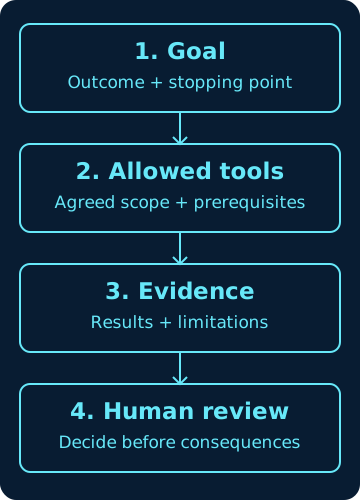
Define the goal and a stopping point first. Agree which tools and data are allowed for that task, check their prerequisites, and collect evidence of what actually happened. Return results and limitations for human review before any consequential action. If evidence is missing or permission is unclear, stop and name the blocker rather than expanding scope.
For example: ask for a review of a supplied dummy paragraph, allow only reading that paragraph, require a list of unsupported claims, and leave publication to a human. The conceptual sequence below describes decision-making, not enforced security isolation.
Separate roles; explicit handoffs
A profile provides its own configuration and conversation state, but profiles running under the same operating-system account are not automatically security sandboxes. Access control must exist at the service, account and filesystem layers where it is needed.
Transfer only the context necessary for the task. Include an accountable owner, expected outcome, acceptance criteria, access dependencies, approval status and next action. A handoff is not permission to make a production change.
Profiles keep settings, memory, skills, sessions and other state separate. They do not create separate OS permissions. A role name is a responsibility label, not an authenticated service identity. Record the intended profile privately before work; do not publish profile inventories or credential-bearing diagnostics.
Skills are procedures, not proof of access
A skill can describe how to use a service without that service being connected. Inventory procedure availability, configured credentials, effective permissions and exercised behavior as separate facts.
Before adopting a skill change, state its purpose, inputs, outputs, prerequisites, owner, version, failure modes and tests. Keep a previous version and a rollback path.
Version-aware checks without changing setup
On an existing installation, the following commands request version or help output; they do not request setup, profile creation or a model call. All four completed successfully for this guide. Hermes reported v0.22.2 (2026.9.24); the separate python3 CLI reported 3.13.5. Do not assume that shell Python is the interpreter managed by Hermes.
Read the help shipped with your installed release before following a command from newer documentation. Keep raw output private: it can contain installation paths or other environment details. A successful help command establishes CLI availability, not provider authentication, tool permissions or a working conversation.
Existing installation: read-only CLI checks
hermes --version
hermes --help
hermes profile --help
python3 --version
Try a real offline handoff completeness check
Download both files to the same local folder, inspect the script, then run the command below from that folder. The JSON describes fictional documentation work, not a real assignment. Python 3.9 or later supplies the standard-library APIs used here; the exercised CLI was Python 3.13.5. No Hermes installation or third-party Python package is needed.
The script reads one UTF-8 JSON file and prints findings. It makes no network requests, executes no handoff actions and writes no files. It requires explicit owner, outcome, scope, acceptance_criteria, deadline, timezone, dependencies, approval_status and next_action fields. This is a completeness check, not security enforcement or a permission grant.
Owner, outcome and next_action must be nonempty text. Scope and acceptance_criteria are nonempty lists of nonempty strings; dependencies is a list that may be empty. Deadline is null when none is agreed, or an ISO timestamp with a UTC offset. Timezone may be UTC, which works without a timezone database, or another IANA name available in your system timezone database. The checker does not compare a deadline’s offset with the named zone or decide whether a deadline is realistic.
Approval status must be not_requested, pending, approved or rejected. Even approved is just a supplied label: this script cannot authenticate its author, establish authority, judge the safety of the scope, or decide whether the next action matches an approval. A human must check those meanings and the actual evidence.
Expected result for the supplied dummy file: “Completeness check passed; not authorization. Human review is still required.” Exit 0 means the fields passed; exit 1 means missing or invalid fields; exit 2 means unreadable/invalid JSON or incorrect usage. Fix missing scope or approval information with the accountable owner; do not invent an approval to turn the output green.
Local tests exercised the actual downloadable script with valid, missing-field (including scope and approval), wrong-type and invalid-JSON fixtures. They also checked that fixture contents were unchanged and no extra files appeared. That evidence covers the example checker, not an autonomous workflow or live service integration.
Offline example — after saving both downloads
python3 validate_handoff.py handoff.jsonIntegration and voice boundaries
Messaging, speech recognition, synthesized replies and live audio are different capabilities. A generated audio file does not prove delivery, and a delivered reply does not prove every incoming-audio path works.
Use allowlisted identities and narrowly scoped permissions. Never place bot tokens, passwords or private service details in public examples. Voice commands require the same approval boundaries as written requests.
Troubleshooting and change records
Start with a reproducible symptom and a read-only check. Distinguish a configured setting from effective runtime behavior; preserve the failed output and explicitly identify missing access. Change one bounded variable, retest and record the result.
Publish technical instructions only when the relevant versions and verification context are known. This overview deliberately avoids claiming that any particular installation command has been tested on your system.
- Symptom: command not found. Check: does hermes --version work in the intended terminal? Next: revisit the official install and shell-launcher instructions for your platform; do not reinstall over existing state as a first response.
- Symptom: documentation names a missing command. Check: hermes --help and hermes profile --help for your installed release. Next: use matching documentation and the supported update path only after separately reviewing the change; do not guess a flag.
- Symptom: help works but normal chat fails. Check: privately compare the selected provider/model and the nonsecret error with Quickstart and FAQ. Next: resolve provider access, endpoint or quota first; do not add a gateway or voice layer to diagnose a broken base chat. No provider check was run for this guide.
- Symptom: a skill loads but its service fails. Check: distinguish the written procedure from installed dependencies, configured authentication and effective permissions. Next: ask the authorized owner to resolve the specific prerequisite; loading another skill does not grant access.
- Symptom: the handoff checker returns exit 1. Check: read the named field error, especially scope and approval_status. Next: clarify missing information with the owner and rerun the offline check. A green result still requires human review.
- Symptom: speech is generated but nobody receives it. Check: separate synthesis, platform delivery and recipient playback evidence. Next: investigate only the approved layer with non-sensitive samples; never treat a generated file as end-to-end voice verification.
Read next, with a purpose
Use Installation to select the supported platform path and Quickstart to establish the provider-first, one-working-chat baseline. Read Profiles before separating persistent assistants, Skills before adopting procedures, and FAQ when comparing a symptom with a documented limitation. These official sources describe the product; the goal/evidence review loop and dummy checker are this publication’s educational examples.
For the contract behind the example, continue to the agent-handoff guide below. For evidence standards, read Evidence before automation. The reading-time estimate covers title, summary and main prose at 200 words per minute; code, downloads and hands-on work are not included.